In the realm of digital creativity, finding tools that seamlessly bridge the gap between imagination and realization is a cherished discovery. One such gem that has taken my creative endeavors to new heights is the Mixamo tool by Adobe. This web-based animation platform has not only simplified the complex world of 3D character animation but has also ignited my passion for crafting captivating visual narratives. In this blog, I’ll share my wonderful journey with Mixamo and how it has transformed my creative process.
A Treasure Trove of Animations
What truly sets Mixamo apart is its extensive library of animations. From dynamic dance moves to lifelike walking cycles, Mixamo boasts a diverse collection that caters to various project needs. As an animator, I found myself lost in this treasure trove, experimenting with different animations to breathe life into my characters. The ability to preview and customize animations before applying them to my characters offered an incredible level of creative control.
Tailored Animation Customization
Mixamo grants artists the power to customize animations to suit their vision. Adjusting parameters like animation speed, blending between animations, and even tweaking character proportions opened up endless creative possibilities. This customization feature turned out to be a game-changer for me, as I could now infuse animations with a unique touch, aligning them perfectly with the story I wanted to tell.
From Idea to Reality
One of the most exhilarating moments in my creative journey was witnessing my characters transition from static models to animated personas. Mixamo empowered me to bring my characters to life in ways I had previously only imagined. Whether it was a quirky dance routine for a light-hearted animation or a dramatic walk for a serious scene, Mixamo’s versatility effortlessly accommodated my artistic visions.
Seamless Integration with Projects
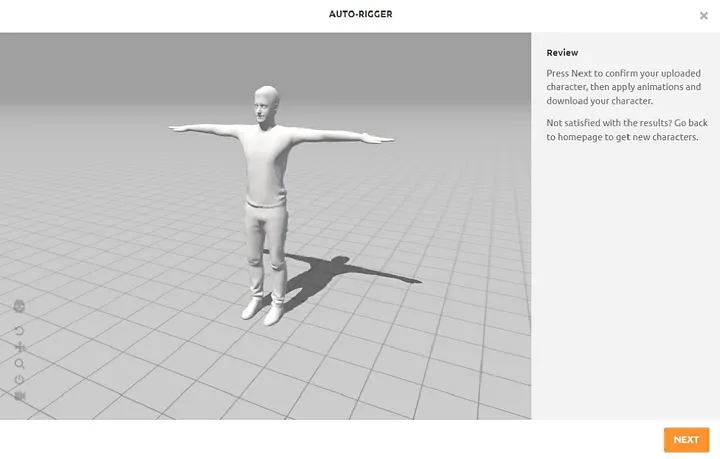
With the animations perfected, Mixamo ensures a smooth transition to the final stages of your project. Downloading the rigged and animated characters in various formats allows easy integration into different software and platforms. This integration eased the process of incorporating my animated characters into video games, animated films, and other creative projects.
Creating a 3D rigged model with animation using Mixamo is a straightforward process. Here are the simple steps to achieve this:
Step 1:
Prepare Your 3D Model
Any FBX, OBJ, or Collada (DAE) format.
Of course, you modeled it properly.
Step 2:
Upload the character to Mixamo (www.mixamo.com) in the characters tab.
Step 3:
Let Mixamo analyze your character and apply appropriate rigging.
Now you’re one click away.
Step 4:
So many options for animations are available in the Mixamo library.
Just click the apply.
Step 5:
You can fine-tune parameters like animation speed and blend mode of the animation.
Step 6:
Easy to download button to save your fully rigged and animated character to your computer.
Step 7:
Import the downloaded FBX or other compatible format into your chosen 3D software, game engine, or animation tool.
Enjoy seeing your 3D model come to life with the animations you selected!
Conclusion
In digital creativity, Mixamo is an innovative and empowering beacon. My experience has been transformative, effortlessly animating my characters. With simplified rigging and a vast animation library, Mixamo democratizes 3D character animation for creators of all backgrounds. As I explore creatively, Mixamo remains a trusted companion in turning imagination into a captivating reality.